
These "active" members have been identified as at risk based on the recency of visits and a sudden stop in attendance. Contact them now, while there is still time to save them from terminating their membership. The list contains the highest paying members who did not have a visit in the last 10 days but had a visit in the 20 days prior.
For example: If today is January 31st, the list will show members who had at least one visit between January 1–20 but did not have a visit from January 21–30.
Content:
Before You Begin
- At Risk Members can be found on the Members page, under the Clients tab.
- The At Risk Members chart permission is required to access this feature.
- Frozen members are excluded from the At Risk Members count.
- The Prediction View is only available with the ChaseIQ add-on. Reach out to your account manager to experience the power of ChaseIQ
Risk Factors
Members are scored by ChaseIQ's churn model. The Risk Factors column surfaces the top two churn drivers per member. Possible factors:
- Lapsed — no recent attendance for an extended period.
- Cancel Signal — explicit cancellation indicator.
- Recent Cancel Intent — recent message or note suggesting intent to cancel.
- Payment Stress — declined payments, past-due balances or billing issues.
- Low Engagement — low visits / interactions relative to peers.
- High Value / Low Engagement — high-spend member whose engagement has dropped.
- Attendance Gap — break in visit cadence vs. their historical pattern.
- New Member — first 30–60 days, when retention risk is highest.
Prediction View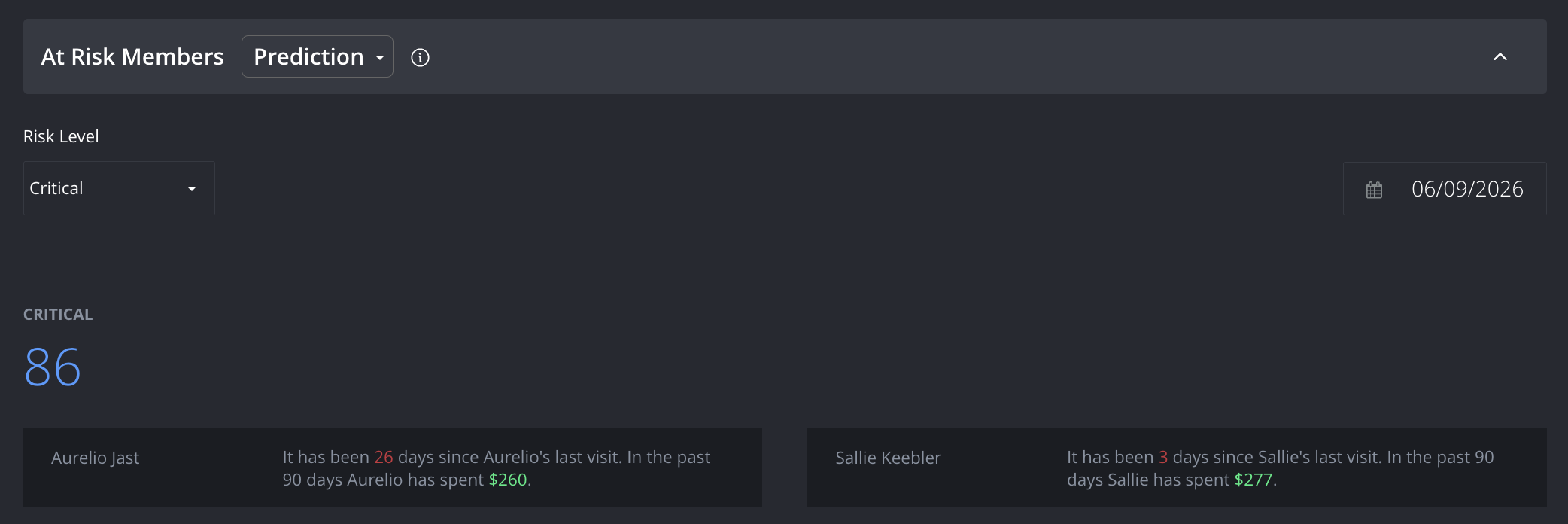
Risk Level: Filter the list by risk grade: Critical, High, Medium, or Low.
Calendar: Select an end date to adjust the reporting window.
Risk Level Total (screenshot displays Critical): The total number of members who match the selected risk level.
Top Two Members: The two members most likely to churn at the selected risk level, called out above the table for immediate action.
Search: Search the At Risk list by any of the available fields.
Download Icon: Export to Excel.
#: The member's at-risk ranking number.
Customer Name: Member's first and last name.
Client ID: The member's ClubReady ID number.
Churn %: The predicted 30-day churn probability.
Last Visit: Date of the member's last completed visit.
Next Booking: If the member has something scheduled the scheduled visit date will be listed.
Credits: The client's available credits according to Remaining Sessions module, but without a 25 credits limit condition.
Risk Factor: Members are scored by ChaseIQ's churn model. The Risk Factors column surfaces the top two churn drivers per member.
Zero Visits View
Include Members with Future Bookings: This toggle will allow you to include or exclude at risk members with a future booking; it affects all data points, scorecards, and the table.
Calendar: Select an end date to adjust the reporting window.
Total: The total number of members.
Contacted: The members who have been contacted since their last visit date. (Data will not include staff name or method type fields not filled out.)
Not Contacted: Members who have not yet been contacted since their last visit date. (Data will not include staff name or method type fields not filled out.)
Top Two Members: The two at risk members called out above the table are the two highest spending clients out of all members that match this criteria.
Search: Search the At Risk list by any of the available fields.
Download Icon: Export to Excel.
View Raw Data: Open the Raw Data tab.
#: The member's at-risk ranking number.
Customer Name: Member's first and last name.
Client ID: The member's ClubReady ID number.
Since Last Visit: Total number of days since the member's last completed visit.
Last Visit: Date of the member's last completed visit.
Membership Option: The membership type option that is current, available.
Last 90 days revenue: Total sales generated by the member; products and services.
Last 90 days visits: Total completed visits by the member.
Next Booking: If the member has something scheduled the scheduled visit date will be listed.
Credits: The client's available credits according to Remaining Sessions module, but without a 25 credits limit condition.
How to Use This Report
The At Risk Members report is designed to help staff prioritize outreach to members who are showing signs of disengagement before they cancel. Use the following workflow to get the most out of it:
- Choose your view. If your club has ChaseIQ, start with the Prediction View to work from a scored, ranked list of members most likely to churn within 30 days. If you do not have ChaseIQ, use the Zero Visits View to identify members who haven't visited recently and haven't been contacted yet.
- Filter by risk level or date. In the Prediction View, use the Risk Level selector to focus on Critical or High risk members first; these represent your most urgent retention opportunities. In the Zero Visits View, use the calendar to adjust your end date and the toggle to include or exclude members with future bookings.
- Review the top two members. Both views surface the two highest-priority members above the table. These are your first calls.
- Check Risk Factors. In the Prediction View, review the Risk Factor column to understand why each member is flagged. Use this context to tailor your outreach; a member flagged for Payment Stress needs a different conversation than one flagged for Low Engagement.
- Prioritize the Not Contacted segment. In the Zero Visits View, use the Contacted / Not Contacted scorecards to focus on members who haven't heard from anyone yet since their last visit.
- Log your outreach. Contact data only reflects staff name and method when those fields are filled out. Make sure your team is logging contact attempts accurately so the Contacted count stays meaningful.
- Export if needed. Use the Download icon to export the list to Excel for bulk outreach tracking or reporting.